Nice Post from another blog:-
30 Years of “Hello, World”: I recently took a vacation the same week as the 4th of July and had lots of time to reflect upon my career to date. It was a little shocking...
Nice Post from another blog:-
30 Years of “Hello, World”: I recently took a vacation the same week as the 4th of July and had lots of time to reflect upon my career to date. It was a little shocking...

The other day, when i asked for some details about outlets from my telephone / cellphone provider by email they replied back to me and sent an attachment (spreadsheet) in ods format which was a pleasant surprise.
In the "past" I have only seen proprietary formats like .xls, .doc, .ppt in my emails as attachments. I used to tear my hair out when I saw haphazard tables and overflowing text whenever I opened "word" documents in LibreOffice and OpenOffice. The less said about opening Excel with "macros" in LibreOffice / OpenOffice the better. Guess, those days of excruciating pain are finally over and we can all move towards a bright future where data is shared in Open document formats.
Three cheers ! for the silent revolution brought about by LibreOffice / OpenOffice / OASIS and co.
Disqus as a comment platform is very good and i am very thankful to them. But they has recently started "turning ON" Advertisements on my blog without my express consent. They did it once in the past and I had documented as to how I reverted back here (Reverting from DISQUS 2012 to older version) . They have done it again . I received a mail in my inbox about providing me with more revenue etc.. and I started seeing advertisements on my blog.
Mail from Disqus about the new disqus and advertisements appearing on my webpages :(

Then i had to go back to Disqus website. Navigate to Settings and under Settings navigate to "Discovery" tab .Then i had to change the "Discovery" settings from increased "Revenue" to "Just comments" and everything is back to normal :)

If are posting an article and if you want to "link" any any webpage or website from your blog or website then you need manually create a html anchor tag and you will need plugin:-
- Webpage url
- Webpage title
To simplify things I have written some bookmarklets which you can easily create in your browsers bookmarks toolbar. You can plugin the below codes in location / url textbox when creating a bookmark or favourites. In Firefox, SeaMonkey and Opera "ctrl+D" is the shortcut to create bookmarks. After creating the bookmarklet all you need to do is navigate to the relevant webpage and then click on the bookmarlet to get the anchor tag in a popup / alert window.
- Get Link with title for webpage.
javascript:window.alert("<a%20href=\""+document.location.href+"\">"+document.title+"</a>");- Get Link with title and a nofollow tag for a webpage. javascript:window.alert("<a%20rel=\"nofollow\"%20href=\""+document.location.href+"\">"+document.title+"</a>");
- Get Link with title no follow and open in new tab or window for a webpage.
javascript:window.alert("<a%20rel=\"nofollow\"%20target=\"_blank\"%20href=\""+document.location.href+"\">"+document.title+"</a>");
The below screenshot shows as to how to create the bookmarklet in SeaMonkey / Firefox after pressing Ctrl+D .

After creation of bookmarlet click on it to get webpage link


This post explains a simple way to format the contents in code tags in blogger. This enables distinguishing content between "source code" and rest of the post .i.e It helps in highlighting the source code in the post. We need to use some CSS to accomplish this.
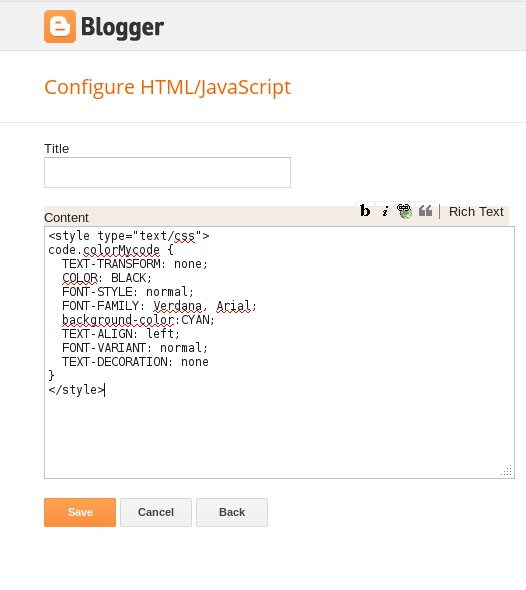
We need to first login into "blogger.com" and then navigate to "Layout" page and then create a new "HTML/JavaScript" gadget and add the below contents inside it and save it.
<style type="text/css">
code.colorMycode {
padding:0.5em;
color:white;
background-color:gray;
clear:left;}
</style>
Notes:- code represent code tag , "colorMycode" is the class you need to use the <code> tag
Screenshot of gadget addition should look like this
When composing a post and you want to add source code you then need to open the HTML mode as shown below and plugin the <code> tags otherwise they would be rendered as it is. i.e. <code> tags will not work in compose mode.
Screenshot showing post being made in HTML mode in blogger

When adding the code in the post you need to ensure that you add a class attribute within the <code> tag as shown below. You should use the same "class" name which is "colorMycode" as defined in the gadget above. Type the below code in HTML mode of the post editor.
<code class="colorMycode">This is sample code</code>
To test whether the source code highlighting works you may click on preview button in the editor and check the content of code tag as shown below.

Citation :- Creating a homepage without tables
Many of the posts on this blog were written using my old keyboard which died today. It almost drove me mad and I wanted to smash it onto the floor and break it into pieces. The keys in the "qwerty" row stopped working. Guess it was a meaningful death for a qwerty layout keyboard. The new keyboard has the "wasd" keys in red instead of the standard black ones. I guess gamers would love these red highlighted "wasd" keys. I am also relieved that this keyboard doesn't have a stupid row of multimedia keys which I never liked. Incidentally this makes the keyboard look sleeker and meaner. The "soft touch" keys on this new keyboard are a welcome relief for my fingers too.
Old keyboard at the top and new one at the bottom of the image

It is very easy to generate HTML links for any webpage based on the page url and page title. The following is a generic piece of code snippet when included in any page of your website will produce a link generator widget. It will automatically create HTML code which will enable others to copy the code and refer to your site easily. It can be included anywhere in the webpage . You can find this widget displayed in the top right hand side of this blog.
The code snippet will get the title of the page and the url of the page and store them in separate variables. Then the code create a HTML link code dynamically using two variables namely page url and title . After that it will write the generated HTML link code into a textarea.
Adding to Blogger
- Login into www.blogger.com
- Clicking on the link with your blog name will take you to blogger dashboard
- In Dashboard click on the layout menu on the left hand side as displayed below
- Then click on "Add a Gadget" link and then in the pop up select HTML/JavaScript gadget as shown below.Then all you need is to use the code snippet and your link creator gadget is ready.
Code Snippet
<style>
textarea#styledText {
    border: 3px solid #cccccc;
    padding: 5px;
    font-family: Tahoma, sans-serif;
}
input.styleButton
{
   font-size:12px;
   font-family:Verdana,sans-serif;
   font-weight:bold;
   color:#775555;
   width:107px;
   height:19px;
   border-style:none;
}
</style>
<script type="text/javascript">
var pageTitle=document.title;
var pageUrl=document.location.href;
urlTextValue="<a href=\""+pageUrl+"\">"+pageTitle+"</a>";
document.write("<textarea name=\"styled-textarea\" id=\"styledText\"onfocus=\"setbgcl('#e5fff3');\" onblur=\"setbgcl('white')\">"+urlTextValue+"</textarea>");
function setbgcl(color)
{
document.getElementById("styledText").style.background=color;
}
function SelecTextInTextArea()
{
document.getElementById("styledText").select();
}
</script>
<blockquote><input type="button" value="Select Text" onclick="SelecTextInTextArea()" class="styleButton" title="Select Text"/></blockquote>
Note:- Style elements adapted from here

This translate tool will essentially give you quite a few html links which when clicked upon will automatically submit the webpage page url to translate.google.com and microsofttranslator.com where you can view the translated version of the same page. The tool depends on the availability of both the services though :-). You need to set the source webpage language in the scripts correctly to ensure that to tool works properly.
Once the source webpage language is set. The scripts have JavaScript arraylist(s) which contain language key-value pairs where the value is displayed in the webpage and the key gets submitted as the part of the submission URL to the translation websites. The for loop in the script essentially creates the translation links dynamically by iterating through the language key value pairs appending them to the translator urls.
The Version of the scripts from this blog which opens the pages in new window or tab and has style sheet applied to the links are further down
Google Translate(Simple)
<script type="text/javascript">
//store page url
var pageUrl=document.location.href;
//Store href beginning string
var hrefBeg='<a href=\'';
//Store href ending string
var hrefEnd='\'>';
//store anchor tag closure
var hrefClosure='</a>';
//set your webpage language here.It should be one from the below arraylists.It //cannot be "mandarin".Use zh-CN
var myLang='en';
//Google translator url.Source page url is set as English
var transHelpPage='http://translate.google.com/translate?sl='+myLang+'&tl=';
//store the url param to indicate page url
var urlBeg='&u=';
//Store space between languages
var spacer=' ';
//Two dimensional JavaScript array to Store language label and label code
var arr = [['af','Afrikaans'],['sq','Albanian'],['ar','Arabic'],['hy','Armenian'],['az','Azerbaijani'],['eu','Basque'],['be','Belarusian'],['bn','Bengali'],['bg','Bulgarian'],['ca','Catalan'],['zh-CN','Chinese'],['hr','Croatian'],['cs','Czech'],['da','Danish'],['nl','Dutch'],['en','English'],['eo','Esperanto'],['et','Estonian'],['tl','Filipino'],['fi','Finnish'],['fr','French'],['gl','Galician'],['ka','Georgian'],['de','German'],['el','Greek'],['gu','Gujarati'],['ht','HaitianCreole'],['iw','Hebrew'],['hi','Hindi'],['hu','Hungarian'],['is','Icelandic'],['id','Indonesian'],['ga','Irish'],['it','Italian'],['ja','Japanese'],['kn','Kannada'],['ko','Korean'],['lo','Lao'],['la','Latin'],['lv','Latvian'],['lt','Lithuanian'],['mk','Macedonian'],['ms','Malay'],['mt','Maltese'],['no','Norwegian'],['fa','Persian'],['pl','Polish'],['pt','Portuguese'],['ro','Romanian'],['ru','Russian'],['sr','Serbian'],['sk','Slovak'],['sl','Slovenian'],['es','Spanish'],['sw','Swahili'],['sv','Swedish'],['ta','Tamil'],['te','Telugu'],['th','Thai'],['tr','Turkish'],['uk','Ukrainian'],['ur','Urdu'],['vi','Vietnamese'],['cy','Welsh'],['yi','Yiddish']];
//For loop to iterate over the two dimensional javascript array
for (var i=0;i<arr.length; i++) {
document.write(spacer+hrefBeg+transHelpPage+arr[i][0]+urlBeg+pageUrl+hrefEnd+arr[i][1]+hrefClosure+spacer);
}
</script>
Microsoft Translate(Simple)
<script type="text/javascript">
//store page url
var pageUrl=document.location.href;
//Store href beginning string
var hrefBeg='<a href=\'';
//Store href ending string
var hrefEnd='\'>';
//store anchor tag closure
var hrefClosure='</a>';
//set your webpage lanuage here.It should be one from the below arraylists.It //cannot be "mandarin".Use either zh-CHS or zh-CHT
var myLang='en';
//Bing translator url.Source page url is set as english
var transHelpPage='http://www.microsofttranslator.com/bv.aspx?from='+myLang+'&to=';
//store the url param to indicate page url
var urlBeg='&a=';
//Store space between languages
var spacer=' ';
//Two sets of single dimensional javascript arrays to Store language label and label code
var LangPair_ToDDL_keys=["ar","bg","ca","zh-CHS","zh-CHT","cs","da","nl","en","et","fi","fr","de","el","ht","he","hi","mww","hu","id","it","ja","ko","lv","lt","no","fa","pl","pt","ro","ru","sk","sl","es","sv","th","tr","uk","vi"];
var LangPair_ToDDL_values=["Arabic","Bulgarian","Catalan","Chinese Simplified","ChineseTraditional","Czech","Danish","Dutch","English","Estonian","Finnish","French","German","Greek","HaitianCreole","Hebrew","Hindi","HmongDaw","Hungarian","Indonesian","Italian","Japanese","Korean","Latvian","Lithuanian","Norwegian","Persian","Polish","Portuguese","Romanian","Russian","Slovak","Slovenian","Spanish","Swedish","Thai","Turkish","Ukrainian","Vietnamese"];
//For loop to iterate over the two dimensional javascript array
for (var i=0;i<LangPair_ToDDL_keys.length; i++) {
document.write(spacer+hrefBeg+transHelpPage+LangPair_ToDDL_keys[i]+urlBeg+pageUrl+hrefEnd+LangPair_ToDDL_values[i]+hrefClosure+spacer);
}
</script>
Google Translator with stylesheet and open in new window / tab customisation

<style type="text/css">
a.pastoral:link {
COLOR: #0000FF;
}
a.pastoral:visited {
COLOR: #800080;
}
a.pastoral:hover {
COLOR: #FF0000;
}
a.pastoral:active {
COLOR: #00FF00;
}
</style>
<script type="text/javascript">
//store page url
var pageUrl=document.location.href;
//Store href beginning string
var hrefBeg='<a href=\'';
//Store href ending string
var hrefEnd='>';
//Store rel param string
var hrefHoldRel='\'rel=\'external\'';
//Store the style param
var styleHolder= 'class=\'pastoral\'';
//store anchor tag closure
var hrefClosure='</a>';
//set your webpage language here.It should be one from the below arraylists.It //cannot be "mandarin"
var myLang='en';
//Google translator url.Source page url is set as English
var transHelpPage='http://translate.google.com/translate?sl='+myLang+'&tl=';
//store the url param to indicate page url
var urlBeg='&u=';
//Store space between languages
var spacer=' ';
//Two dimensional javascript array to Store language label and label code
var arr = [['af','Afrikaans'],['sq','Albanian'],['ar','Arabic'],['hy','Armenian'],['az','Azerbaijani'],['eu','Basque'],['be','Belarusian'],['bn','Bengali'],['bg','Bulgarian'],['ca','Catalan'],['zh-CN','Chinese'],['hr','Croatian'],['cs','Czech'],['da','Danish'],['nl','Dutch'],['en','English'],['eo','Esperanto'],['et','Estonian'],['tl','Filipino'],['fi','Finnish'],['fr','French'],['gl','Galician'],['ka','Georgian'],['de','German'],['el','Greek'],['gu','Gujarati'],['ht','HaitianCreole'],['iw','Hebrew'],['hi','Hindi'],['hu','Hungarian'],['is','Icelandic'],['id','Indonesian'],['ga','Irish'],['it','Italian'],['ja','Japanese'],['kn','Kannada'],['ko','Korean'],['lo','Lao'],['la','Latin'],['lv','Latvian'],['lt','Lithuanian'],['mk','Macedonian'],['ms','Malay'],['mt','Maltese'],['no','Norwegian'],['fa','Persian'],['pl','Polish'],['pt','Portuguese'],['ro','Romanian'],['ru','Russian'],['sr','Serbian'],['sk','Slovak'],['sl','Slovenian'],['es','Spanish'],['sw','Swahili'],['sv','Swedish'],['ta','Tamil'],['te','Telugu'],['th','Thai'],['tr','Turkish'],['uk','Ukrainian'],['ur','Urdu'],['vi','Vietnamese'],['cy','Welsh'],['yi','Yiddish']];
//For loop to iterate over the two dimensional javascript array
for (var i=0;i<arr.length; i++) {
document.write(spacer+hrefBeg+transHelpPage+arr[i][0]+urlBeg+pageUrl+hrefHoldRel+styleHolder+hrefEnd+arr[i][1]+hrefClosure+spacer);
}
//This function can be used to add a target="_blank" attribute to all anchor tags //with a rel="external" attribute
function externalLinks() { if (!document.getElementsByTagName) return; var anchors = document.getElementsByTagName("a"); for (var i=0; i<anchors.length; i++) { var anchor = anchors[i]; if (anchor.getAttribute("href") && anchor.getAttribute("rel") == "external") anchor.target = "_blank"; } } window.onload = externalLinks;
</script>
Bing / Microsoft Translator with stylesheet and open in new window / tab customisation
<style type="text/css">
a.microBing:link {
COLOR: #0000FF;
}
a.microBing:visited {
COLOR: #800080;
}
a.microBing:hover {
COLOR: #FF0000;
}
a.microBing:active {
COLOR: #00FF00;
}
</style>
<script type="text/javascript">
//store page url
var pageUrl=document.location.href;
//Store href beginning string
var hrefBeg='<a href=\'';
//Store href ending string
var hrefEnd='>';
//Store rel param string
var hrefHoldRel='\'rel=\'external\'';
//Store the style param
var styleHolder= 'class=\'microBing\'';
//store anchor tag closure
var hrefClosure='</a>';
//set your webpage lanuage here.It should be one from the below arraylists.It //cannot be "mandarin".Use either zh-CHS or zh-CHT
var myLang='en';
//Bing translator url.Source page url is set as English
var transHelpPage='http://www.microsofttranslator.com/bv.aspx?from='+myLang+'&to=';
//store the url param to indicate page url
var urlBeg='&a=';
//Store space between languages
var spacer=' ';
//Two sets of single dimensional javascript arrays to Store language label and label code
var LangPair_ToDDL_keys=["ar","bg","ca","zh-CHS","zh-CHT","cs","da","nl","en","et","fi","fr","de","el","ht","he","hi","mww","hu","id","it","ja","ko","lv","lt","no","fa","pl","pt","ro","ru","sk","sl","es","sv","th","tr","uk","vi"];
var LangPair_ToDDL_values=["Arabic","Bulgarian","Catalan","ChineseSimplified","ChineseTraditional","Czech","Danish","Dutch","English","Estonian","Finnish","French","German","Greek","HaitianCreole","Hebrew","Hindi","HmongDaw","Hungarian","Indonesian","Italian","Japanese","Korean","Latvian","Lithuanian","Norwegian","Persian","Polish","Portuguese","Romanian","Russian","Slovak","Slovenian","Spanish","Swedish","Thai","Turkish","Ukrainian","Vietnamese"];
//For loop to iterate over the two javascript arrays
for (var i=0;i<LangPair_ToDDL_keys.length; i++) {
document.write(spacer+hrefBeg+transHelpPage+LangPair_ToDDL_keys[i]+urlBeg+pageUrl+hrefHoldRel+styleHolder+hrefEnd+LangPair_ToDDL_values[i]+hrefClosure+spacer);
}
//This function can be used to add a target="_blank" attribute to all anchor tags //with a rel="external" attribute
function externalLinks() { if (!document.getElementsByTagName) return; var anchors = document.getElementsByTagName("a"); for (var i=0; i<anchors.length; i++) { var anchor = anchors[i]; if (anchor.getAttribute("href") && anchor.getAttribute("rel") == "external") anchor.target = "_blank"; } } window.onload = externalLinks;
</script>
Note:-open links in new window/tab is from this site
DISQUS 2012 can really damage your blogger stats.You can find below a way to revert back to older system. I am using DISQUS in my blog for quite a few months now. I like DISQUS commenting platform a lot for it offers many features like the "Like" page button, nested commenting, trackball URL, reactions etc. which are not present in the default commenting system in blogger. A few days ago I jumped the gun and switched from older version of DISQUS to DISQUS 2012 when saw the link Activate Disqus 2012 for your site » in DISQUS's website. I did not think before acting and without properly studying the consequences of going in for the new system had taken a bite at the carrot that dangled before my eyes. From that point onwards all hell broke loose. I could not keep track of any stats in the blogger platform.Below is the screenshot showing how badly the DISQUS 2012 comment system has damaged the Referring URLs stats.

Although the above un intelligent stats rendered my blogger stats next to useless, the DISQUS 2012 system spared me further agony by not affecting my stats pages at statcounter. Since majority of the referral URLs appear to be redirects they have a potential to lower your sites reputation. I also learned from DISQUS's website that DISQUS 2012 now uses iframe. I am not an web wizard but I did notice that frames are bad for any website's health.
Now I have turned off the new DISQUS 2012 system though it looked much cooler than older system. I don't know at this point of time whether my blogger stats will be back to normal from now onwards. Thankfully reverting to old system is quite simple. According to DISQUS's website "You can disable Disqus 2012 off at any time at the top of your admin's Settings > General page".
All I needed to do was login into my account, navigate to this admin page after which I located the settings tab on top right hand side of the webpage.

Then I had to un-check the Disqus 2012 Checkbox under "Basic Settings" label available in "General" tab as shown below. One needs to ensure that the "Save Changes" button at the bottom of the page is pressed after un-checking the check box in order to confirm the changes.

I am hoping that my blogger stats will be back to normal. All that is left to do is to wait and watch and hope for the best. I keeping my fingers crossed too ...just in case :-)
Update(03Sep2012):- The problem of redirection ULRs in blogger stats has gone away after I reverted back to Older version of DISQUS


The terrorist were very well trained and were equally well equipped with the latest gear. The amount of ammo that they carried with them was insane and they were using night vision goggles with other ultrasonic radio communication gear.Source:-Link


http://feedshark.brainbliss.com/
http://pingates.com/
http://pingomatic.com/
http://blogsearch.google.com/ping
http://www.blogpingtool.com/
http://www.pingoat.com/
http://www.millionping.com/
http://pingler.com/
http://www.pingblognow.com/
http://www.blogpingsite.com/
http://www.seo41.com/blog-ping.php
http://www.blogpingtool.com/




 =