Add Personal Touch To Blogger By Adding Fav Icon
After playing around with the various templates and applying them onto my blog an trying out the gadgets i have tried to add one more piece customisation to my blog by creating a fav icon.Th favourite icon not only adds a nice touch to the web page but also shows up in the bookmarks whenever you bookmark your web page in your browser.
Step 1:-
Create Icon in Pinta
The first step involves creating the icon file. I have used a tool called pinta which is a light weight image editor for which i am using to creating a simple icon file. Get your 1-click installer for pinta here
==>Open Pinta
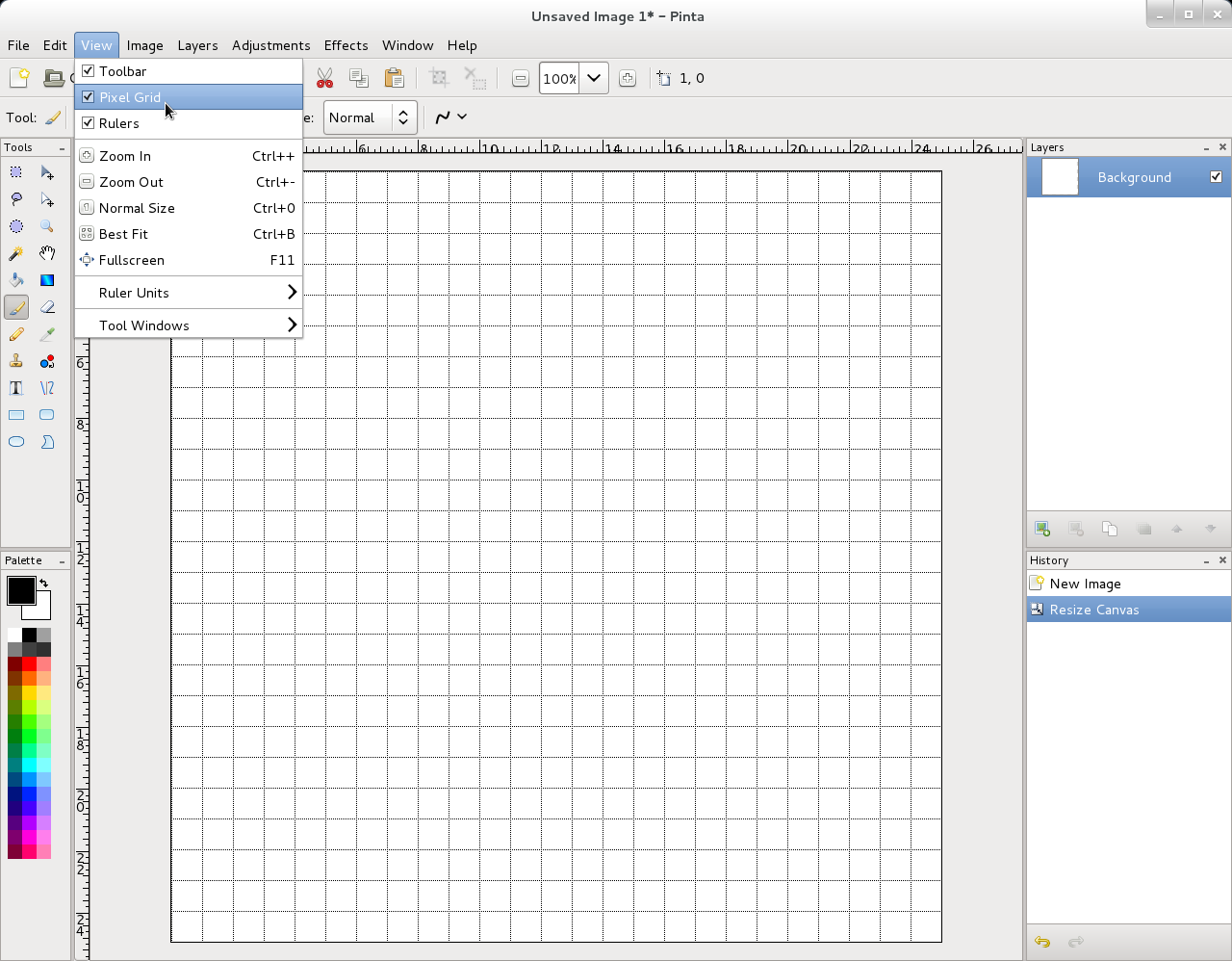
==>Resize Canvas To either 16x16 , 32X32 or 25X25 Pixels
==>Ensure that Pixel Pixel rid and Rulers are on.This will help greatly while working with individual pixels as well as aligning your icon
==>To create a simple text based icon use the bucket tool to cover all the pixels with a single colour
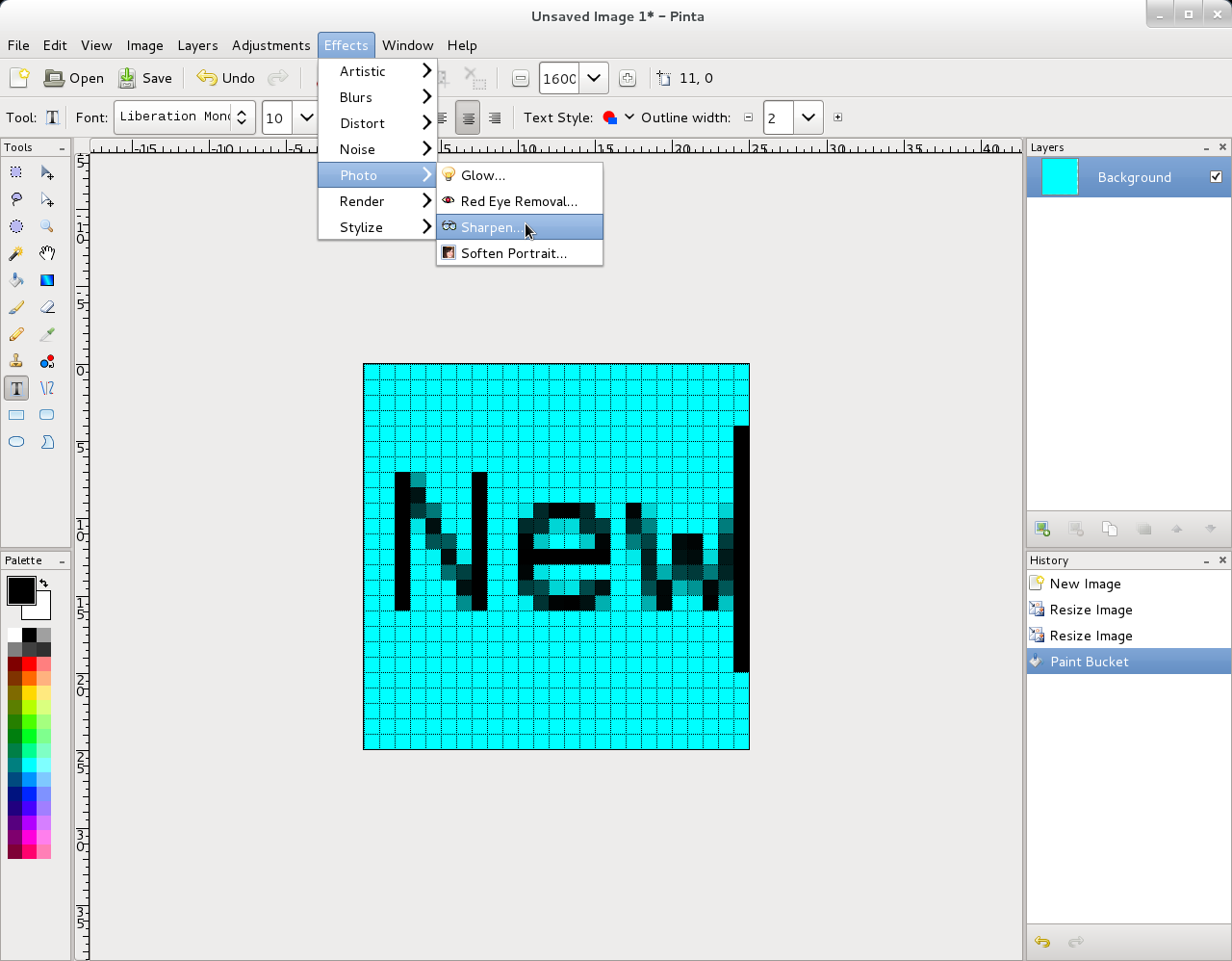
==>Type in the required Text in a contrasting colour.
==> You can Apply effects like Sharpen to make the wording crispier.
==>Also note that you can choose the required font for the text to appear funky or stylish
==>Save the image in ".ico" format
==>Of course if you are good with image creation tools you can create varied patterns and designs and thus create nice icon files
==>Always upload the image and test whether the icon look fine.Though your design might awesome,one uploading it to site it might not look fabulous.
Step 2:-
Adding icon to Blogger
==>After logging into blogger ,click on "design" link of your blog
==>In the design page click on the "Edit" link of the " gadget.
==>Browse your desktop,locate the icon file that you have created and save the page.
==>After this step i would advise to close all the browser windows and clear the browser cache and restart the blogger and view the blog.This step is needed because typically browsers cache the fav icons and they will not show new fav icon unless the browser is closed and opened.The below screen shots show the blog before and after the fav icon change
Highlights Your Posts
It will make your posts stand out in the Reading Lists in blogger if one follows you in blogger. If anyone subscribes to your blogs rss feed too your favourite icon will get displayed.
Showing posts with label FAVOURITE. Show all posts
Friday, 2 December 2011
Wednesday, 19 October 2011
How To Add & Remove Application from Favourites in GNOME 3.0[Pictorial]
Add Application To FavouritesTo to to GNOME application menu move your mouse to the top left hand side corner of your desktop onto "Activities" label.To add an application to the favourites bar click on Applications "tab" at the top and then right-click on your favourite application and then click on "Add to Favourites" menu
Application Added To FavouritesAfter adding to Favourites you can easily locate your application on favourites menu.Your can then drag the icons in the favourites menu/bar to re-arrange the order of your favourite applications
Remove Application From FavouritesTo remove an application from favourites bar you can right - click on the required application and remove it from the favourites menu/bar.
Wednesday, 5 September 2007
Dogpile Search Added
Well people , I have added dogpile search box to this blog . It is my favourite search engine because one i like its blue theme and also the dog motif on the home page . Also it is a meta search engine(Queries other search engines and displays results from those).I like the "search history" feature where one can see all the searches one has done previously.I find this feature useful at times . Now people visiting blog can check dogpile out from the dogpile search I added to this page .
Subscribe to:
Posts (Atom)


