Nautilus "open as admin" hack is about opening Nautilus in administrator mode to quickly change permissions, ownership of files and folders. This hack will add an "openAsAdmin" menu to the context menu or right click. This hack has been tested on openSUSE 12.2 / GNOME 4.3.2. Here goes the explanation. I have two users on my system, "mantis" and "test". I am logged in as
mantis and I see "x" or cross marks on the files in my folder indicating that "mantis" doesn't own this file. The link "series.txt" is being owned
by "test".
I open command launcher (ALT+F2) and type in the command "alacarte" and hit return / enter key. This will open GNOME 3.X menu editor. I add an new entry by pressing the "New Item" button as shown below.
The Command that needs to be added is "gnomesu nautilus %U".
Now when i right click on the any file that I need to change permission I find the "OpenAsAdmin" menu under "Open With" ==> "Other Applications". When i invoke this menu it asks me enter administrator password or passcode.
After entering the passcode i see a new Nautilus widow running in administrator mode and this will allow me to change the permissions and ownership of various files and folders using the "properties" menu, permission tab as shown below. After finishing things we simply need to close the nautilus window running in administrator mode.
This is super short guide to tackle the dreaded "man" pages in Linux. I think getting comfortable with "man" pages is the first thing any Linux newbie should aim for. I first came across man on a "sco unix" dumb terminal and I had to restart my machine to exit "man" :-(. I found "man" to be unwieldy at the same time very informative.
Is Man for Man possible ?
Yes you do have a Manual for Man command. When you open a terminal and run the command "man man" it will throw a tantrum and ask "What do you want man ?". After a few seconds it relents and begins to show the manual / help info for "man".
Command :- man man
What do you want buddy ?
And then it relents and shows manual for man
Can we save and read Man later ?
If you don't like to read man pages in a terminal or command line (cli) and you want to read it from a file then you can redirect the man output to as text file using the symbol (>) . You can read Manual from a text file now instead of terminal. The command that needs to be run in the terminal is:-
Command :- man grep>ManualGrep.txt
Can we Search in Man ?
Once you open man for any command you can easily search for any particular piece of information by typing a forward slash (/) and typing in the search string. For example you are running a man on zypper and want to find the option to "force" a reinstall of an existing package,then all you need to do is run the command "man zypper " and then type "/force" to find the relevant option.
Command :- /force or /<SearchString>
Can we open Man outside terminal ?
If you want to read manual for a particular command (eg:-zypper) outside terminal then all you need to do is open Quick Launch window(press Alt+F2 ) in GNOME and then type in "gnome-help" followed by a space and then "man" and then the relevant command. "Man" and the "command" should be separated by a colon. Doing this will open the Manual for zypper in a more appealing GNOME help reader. This approach works under GNOME 3.4.2/ openSUSE 12.2.
Command :- gnome-help man:grep or xdg-open man:grep
If run the man command inside application launcher like this
I can see man for zypper inside gnome-help like this
How can I quit man?
It is very frustrating that man doesn't support the commands like CTRL + C which usually Cancels most of the currently running and CTRL + D which would usually close the terminal windows. As I have said before only a simple command 'q' (without apostrophes) will help us exit an open Manual.
I hit upon a idea about comparing the various Linux distros based on forum statistics. I visited the forums of various popular distros (openSUSE, Fedora, Debian, Mint, Arch, Ubuntu) and then collected the stats displayed on the forums home page.
Raw Data
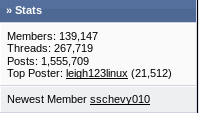
The first step involved collecting raw data about the number of registered members in each forum and other stuff like number of threads , no of active users etc: I couldn't find active users statistics for all forums and each distro preferred to use a different bulletin board software. I collected screenshots of the stats too as shown below.
Number Crunching
Registered Users :- The number of users in each forum may be taken as some sort of rudimentary proof of popularity of a distro. Ubuntu takes the first place which should not surprise anyone. Fedora and Debian are neck and neck and both of them take the next two places.
| Distro |
Members |
| Ubuntu |
1762103 |
| Fedora |
139147 |
| Debian |
132589 |
| Mint |
81833 |
| openSUSE |
71137 |
| Arch |
44823 |
No of Threads :- This set of stats threw up a few surprises. openSUSE took third place in the list. I guess old threads were archived by some of the forums.
| Distro |
Threads |
| Ubuntu |
1906499 |
| Fedora |
267719 |
| openSUSE |
175115 |
| Arch |
148545 |
| Mint |
108243 |
| Debian |
69950 |
No of Threads per member :- I think this stat should tell as to whether the distro is able to sustain interest with its users over longer periods of time. We find that Ubuntu does poorly in this regard. May be unity had a role to play in this. Arch and openSUSE seem to paying more attention to their much smaller communities than some of the more popular distros.
| Distro |
Members |
Threads |
Mem Vs Thr
(Thr/Mem) |
| Arch |
44823 |
148545 |
3.3140352051 |
| openSUSE |
71137 |
175115 |
2.46165849 |
| Fedora |
139147 |
267719 |
1.9240012361 |
| Mint |
81833 |
108243 |
1.3227304388 |
| Ubuntu |
1762103 |
1906499 |
1.0819452665 |
| Debian |
132589 |
69950 |
0.5275701604 |
Conclusion:- It is not enough that a distro is popular . It should pay heed to the needs of its community. All the stats presented are subjective and should be taken with a pinch of salt as many of the distros have been known to conduct day to day discussions on IRC and mailing lists too. It is not being taken into account here :-)